SI Explorer File menu | Process & Print | Reports tab
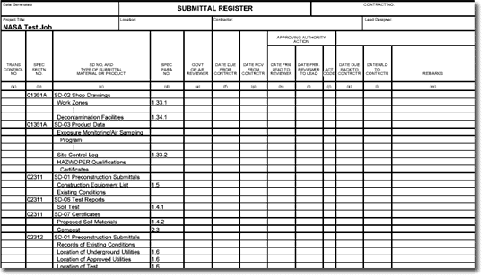
The Submittal Register lists the materials, products or items for each Submittal cited in the Job, as well as the Section and paragraph number locations, and any required approval.
When the Submittal Register is generated, the system:
Searches for the Submittal Article within PART 1 of each selected Section.
Locates all tagged Submittal Descriptions (SDs) listed in each Section's Submittal Article.
Locates the Submittal Items appearing below the SDs and throughout the Section.
Generates the Submittal Register and inserts the Subpart location for each Submittal Item in the Sections' text (outside the Submittal Articles).
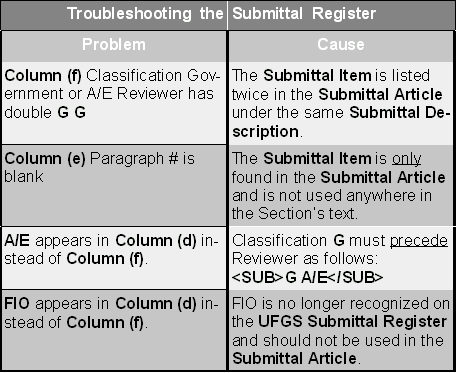
Trouble shooting the Submittal Register

You can print a copy of only a Job's Submittal Register without printing the whole Job.
Click the File menu | Process & Print/Publish.
Click the Sections tab, and uncheck Print/Process Sections in the Printing/Renumbering area.
Click the Reports tab, and check only the Submittal Register.
Click the Process & Print button.
Only the Submittal Register will be sent to your default printer.
The Submittal Register does not appear in the SI Explorer’s Processed Files folder the way the other reports and lists do. It will, however, print when you choose Process & Print. If you are publishing to PDF, it will appear in the PDF Files folder in the SI Explorer, and you can view it in that format.
 To ensure that the Submittal
Register prints correctly when using PDF
Writer 4.0 as your selected printer, see Printer
Setup.
To ensure that the Submittal
Register prints correctly when using PDF
Writer 4.0 as your selected printer, see Printer
Setup.
 SpecsIntact provides the capability to modify
Submittal information by creating a Submittal database disk for the Job
with the Submittal Register Program.
This program's information is meant to be used by engineers working in
the field and changes cannot
be transferred back into SpecsIntact.
SpecsIntact provides the capability to modify
Submittal information by creating a Submittal database disk for the Job
with the Submittal Register Program.
This program's information is meant to be used by engineers working in
the field and changes cannot
be transferred back into SpecsIntact.