Export Excel XML Spreadsheet - Editor Table Menu
This command will Export an existing SpecsIntact Formatted Table to an Excel XML Spreadsheet.
To Export a SpecsIntact Formatted Table to an Excel XML Spreadsheet:
Place cursor over the first cell
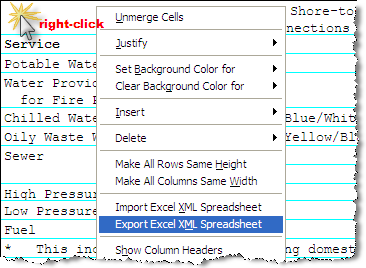
Right-click and choose Export Excel XML Spreadsheet
From the Specify File Name dialog Box, browse to the location in which the file will be saved.
In the File Name field, type the filename
Select Save
Once the SpecsIntact Formatted Table has been saved to an Excel XML Spreadsheet a dialog box will confirm the table has been saved and its location.

SpecsIntact tables have similar characteristics to Microsoft Worksheets. Table Editing tips can be found on the Table | Insert | Table topic.
