Sections Menu -- Rename

This command allows you to change the Section number for the Section selected in the right pane based on MasterFormat™ 1995 or MasterFormat™ 2004 Edition Section numbers.
In the dialog box, you have the option to pick "CSI MasterFormat" 1995 or 2004 numbering.
If you select "1995" simply type the five or six character number in the text box.
If you select "2004", choose the appropriate level as shown below.
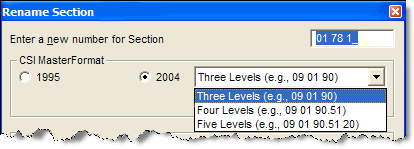
In the text box, for "Enter a new number for Section". type the new MasterFormat™ 2004 number.

When renaming a Section to MasterFormat™ 2004, the text box is preformatted requiring you enter only the numeric characters, no spaces or period need to be entered.
If the new Section number already exists in the Job, you will be asked if you want to overwrite the existing Section with that number. If you choose a number that does not conform to the numbering rules, a warning box will display.
If the new Section number conflicts with the Jobs MasterFormat setting, a warning box will display stating you are using a valid MasterFormat 2004 number, but this conflicts with the Jobs MasterFormat setting.
 This dialog box provides a link to the latest "UFGS MasterFormat™ 1995 to MasterFormat™ 2004 conversion
table."
This dialog box provides a link to the latest "UFGS MasterFormat™ 1995 to MasterFormat™ 2004 conversion
table."
Check boxes are provided to indicate whether you want the system to automatically change the number in the Section Header, Section (SCN) tags (these boxes are checked by default) and Change Section Number References throughout the Job.